Overview
CheddrAI is your intelligent restaurant assistant built directly into CheddrSuite. It can answer questions about your sales, schedule, and inventory using real data from your account, saving yo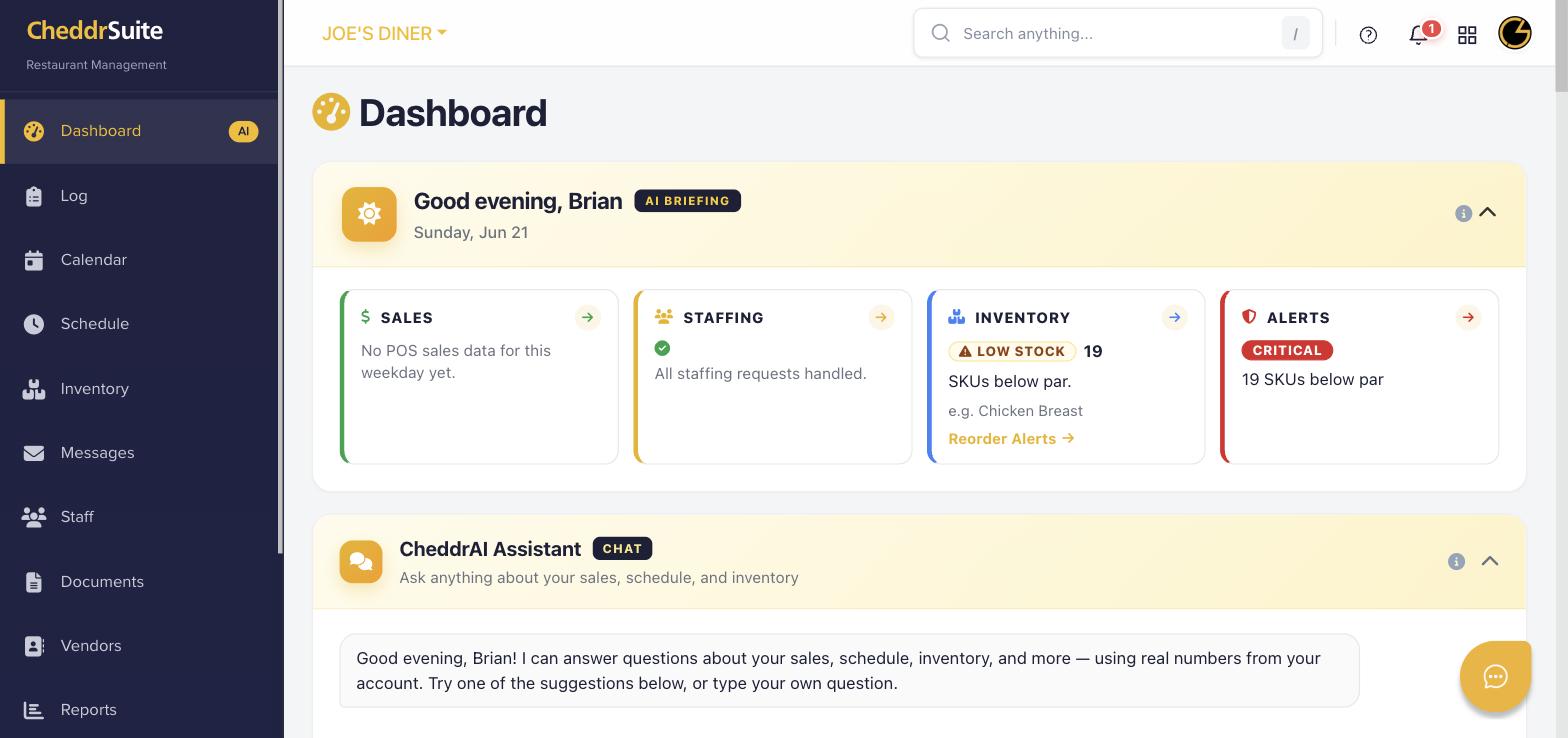 u time and providing instant insights.
Step 1: Access CheddrAI from the Dashboard
Go to your Dashboard by clicking the Dashboard icon in the left navigation. Scroll down to the CheddrAI Assistant section labeled CHAT.
Step 2: Ask a Question
Type any question in the chat input box. For example: "What were my sales last week?", "Who is scheduled tomorrow?", or "What ingredients are below par?" CheddrAI will respond with real data from your account.
Step 3: Use Suggested Prompts
CheddrAI displays suggested questions below the chat box. Click any suggestion to instantly get insights about staffing, inventory alerts, or sales performance without typing.
Step 4: Review the AI Briefing
At the top of your Dashboard, the AI Briefing section gives you a morning summary covering sales, staffing status, inventory alerts, and any critical issues for the day.
Step 5: Ask Follow-Up Questions
CheddrAI maintains context within your session, so you can ask follow-up questions. Continue the conversation to drill deeper into any metric or issue it surfaces.
Was this article helpful?
That’s Great!
Thank you for your feedback
Sorry! We couldn't be helpful
Thank you for your feedback
Feedback sent
We appreciate your effort and will try to fix the article